Invoicing
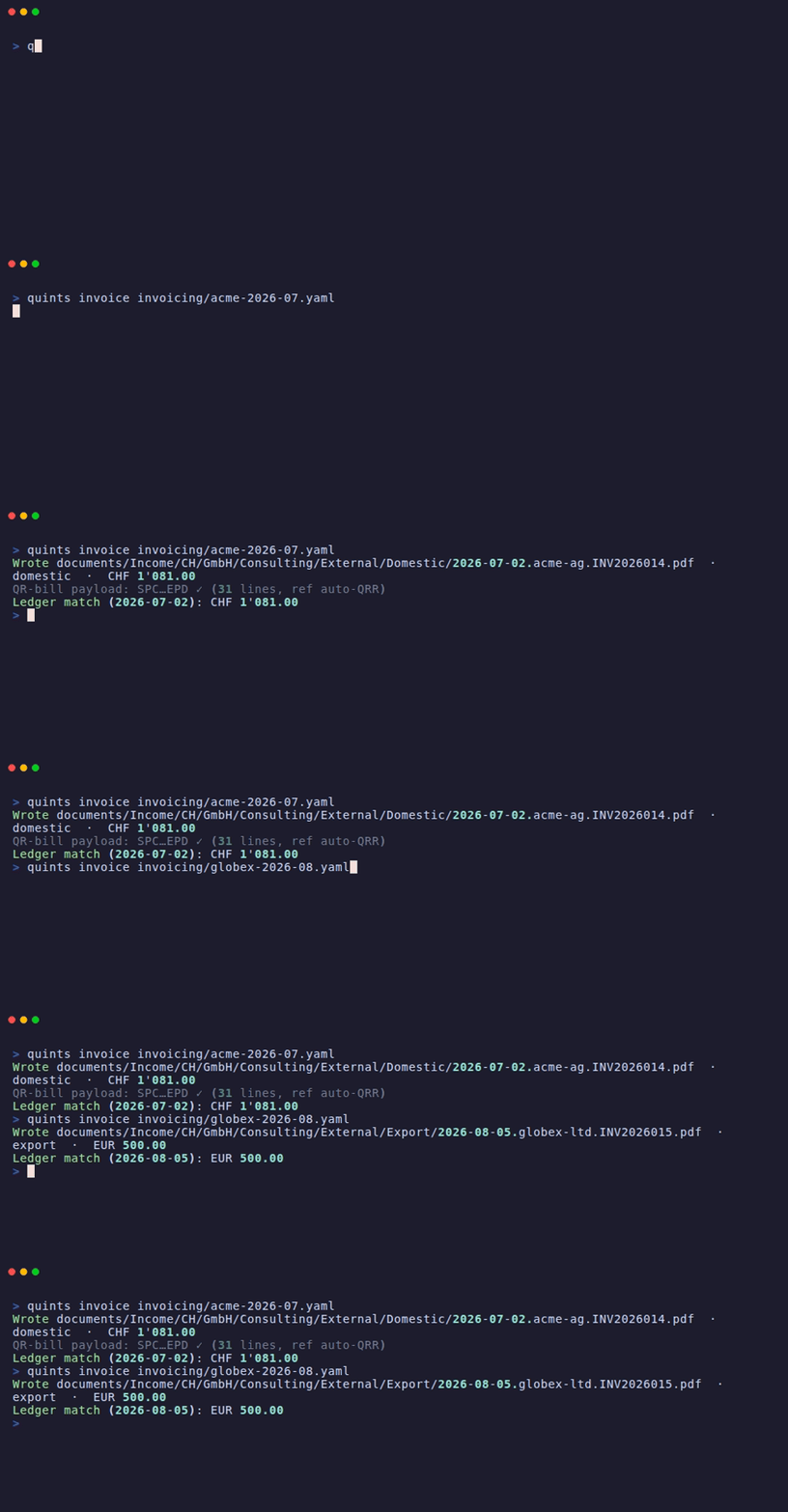
Render a QR-bill
Writes a Swiss QR-bill PDF (domestic, or export/reverse-charge without QR
part) and cross-checks the total against your ledger: if the invoice is
already booked at a different amount, you get a conflict, not a silent
divergence. If it isn't booked yet, quints prints the draft transaction to
paste into books/<year>.bean.
The PDF is filed the way beancount documents are filed — under the income
account's folder, date-prefixed, so option "documents" and Fava pick it up:
The customer part is the registry key from customers.yaml (the slugified
name for inline customers). --out overrides the location when you need to.
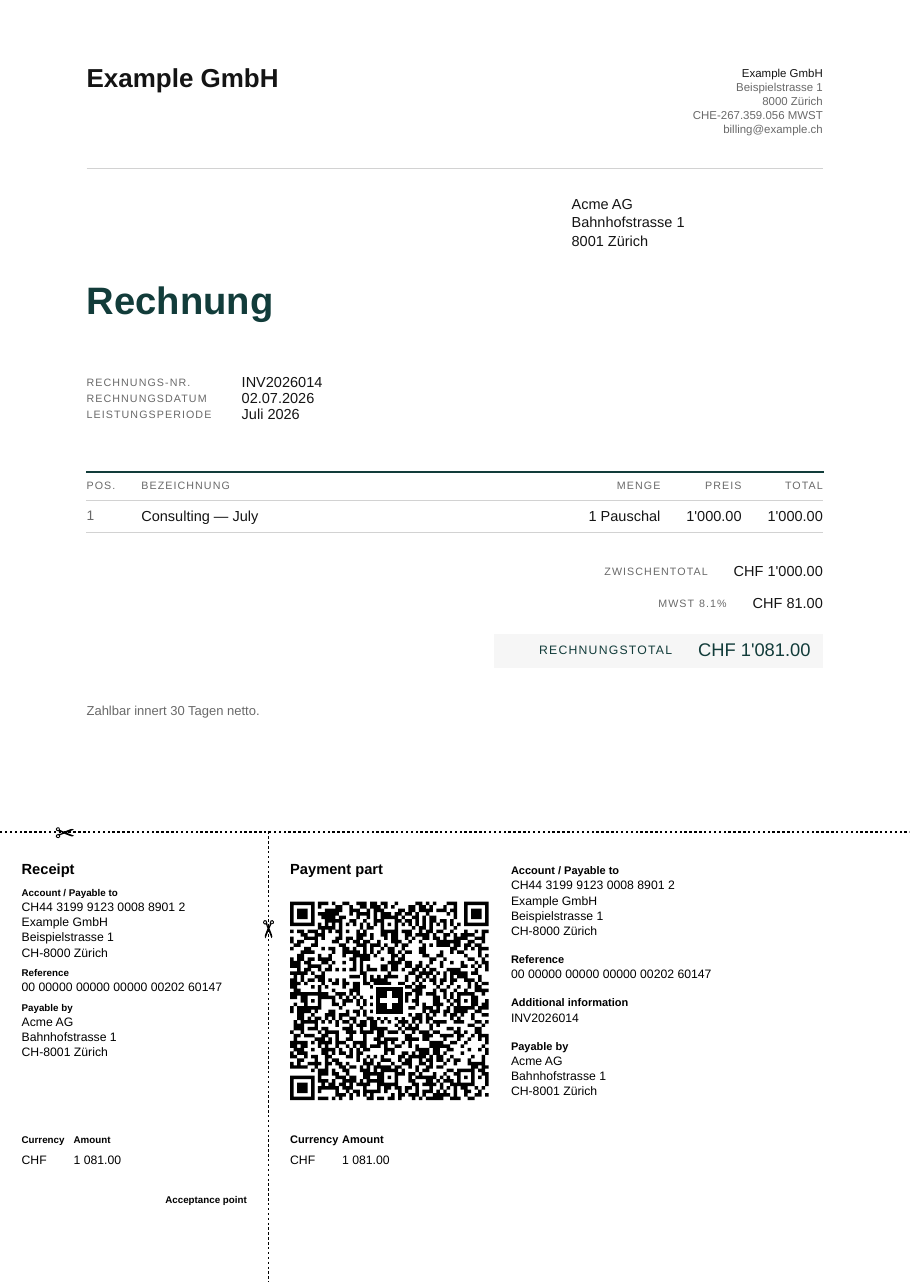
An invoice is one YAML file:
number: INV2026014
kind: domestic          # or export (reverse charge, no QR part)
currency: CHF
issue_date: 2026-07-02
supply: Juli 2026
customer:
  name: Acme AG
  address:
    - Bahnhofstrasse 1
    - 8001 Zürich
items:
  - description: Consulting — July
    quantity: 1
    unit_price: 1000.00
locale: de_CH
Issuer identity — name, address, VAT ID, bank details per currency, logo —
lives once in invoicing/issuer.yaml. Repeat customers can live in
invoicing/customers.yaml and be referenced by key (customer: acme).
Bank details
One account per invoicing currency, under bank:
bank:
  CHF:
    iban: CH93 0076 2011 6238 5295 7     # the account invoices are paid into
    bic: POFICHBEXXX
    bank_name: PostFinance AG, Bern      # optional
    # reference: qrr                     # see "Payment reference" below
    # qr_iban: CH57 3000 0123 0008 8901 2
    # qr_reference_id: "123456"          # the six digits your bank assigns you
  EUR:
    iban: DE89 3704 0044 0532 0130 00
    bic: COBADEFFXXX
    bank_name: Commerzbank AG, Köln
    holder: Example GmbH                 # optional — if not the issuer
Every IBAN is checked at load (length, national layout, mod-97 check digits) and every BIC against ISO 9362, so a transposed digit fails before the PDF exists rather than after it was sent.
bic is mandatory for any currency you invoice abroad in. An export
invoice refuses to render without one: it goes on the PDF as BIC/SWIFT,
next to the beneficiary and the bank's name, so the payer copies it instead
of looking one up — a guessed BIC is how a SEPA transfer comes back. quints
never derives it from the IBAN: that mapping lives in a bank registry that
changes, and a wrong-but-plausible BIC would be worse than none. Ask the bank
that holds the account.
To check a pair before it ships — or every account in the issuer config:
It reports the country, the institution (IID) for Swiss and Liechtenstein IBANs, and flags a BIC whose country doesn't match the IBAN's — normal for a payment provider (a Wise EUR account is a Belgian IBAN), wrong if you pasted another account's code. It exits non-zero when something is off, so it fits a pre-flight check.
Payment reference
Every invoice asks to be paid with a structured reference, so the payment arrives carrying its own invoice id. Switzerland has two, each tied to a different kind of bank account, and quints picks the Swiss-native one whenever your account can carry it:
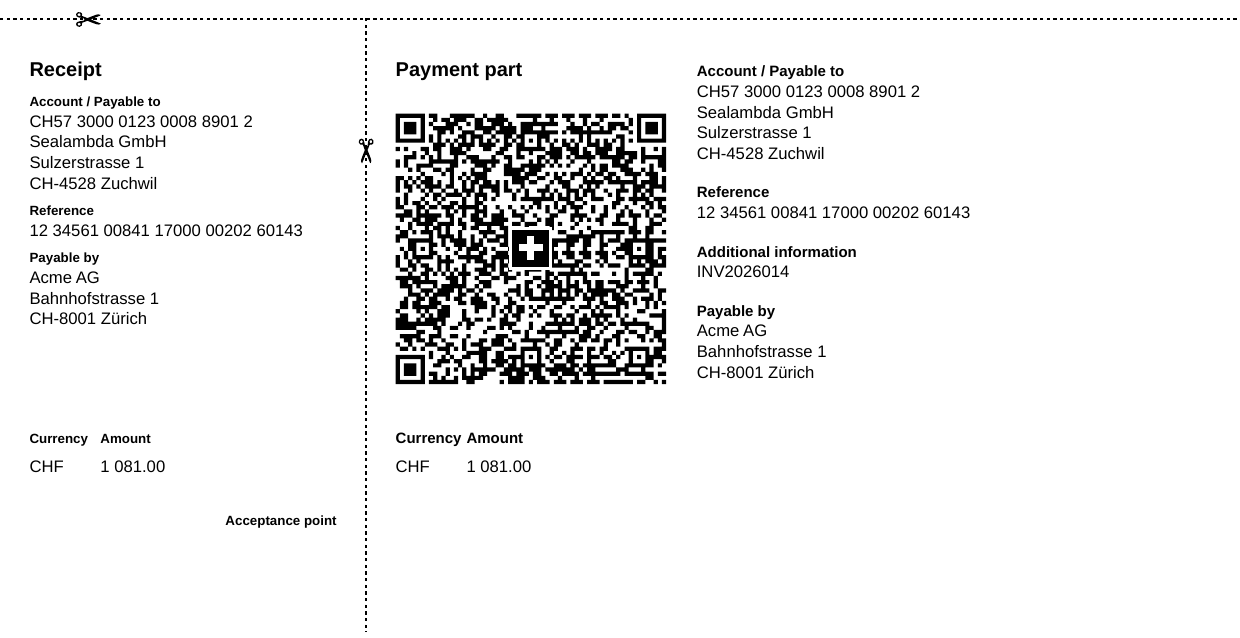
QRR — the Swiss QR reference, paid into a QR-IBAN. The payer's bank
refuses any payment to a QR-IBAN without a valid reference, so every payment
that reaches you is matchable. It is numeric — quints encodes the invoice
number so its digits stay visible at the end — and CHF-only. An account with a
qr_iban uses it for CHF QR-bills without further ado; add the six-digit
identification your bank assigns you, and keep the regular iban for CHF from
abroad:
bank:
  CHF:
    qr_iban: CH57 3000 0123 0008 8901 2
    qr_reference_id: "123456"   # quoted: YAML reads a leading zero as octal
    iban: CH93 0076 2011 6238 5295 7
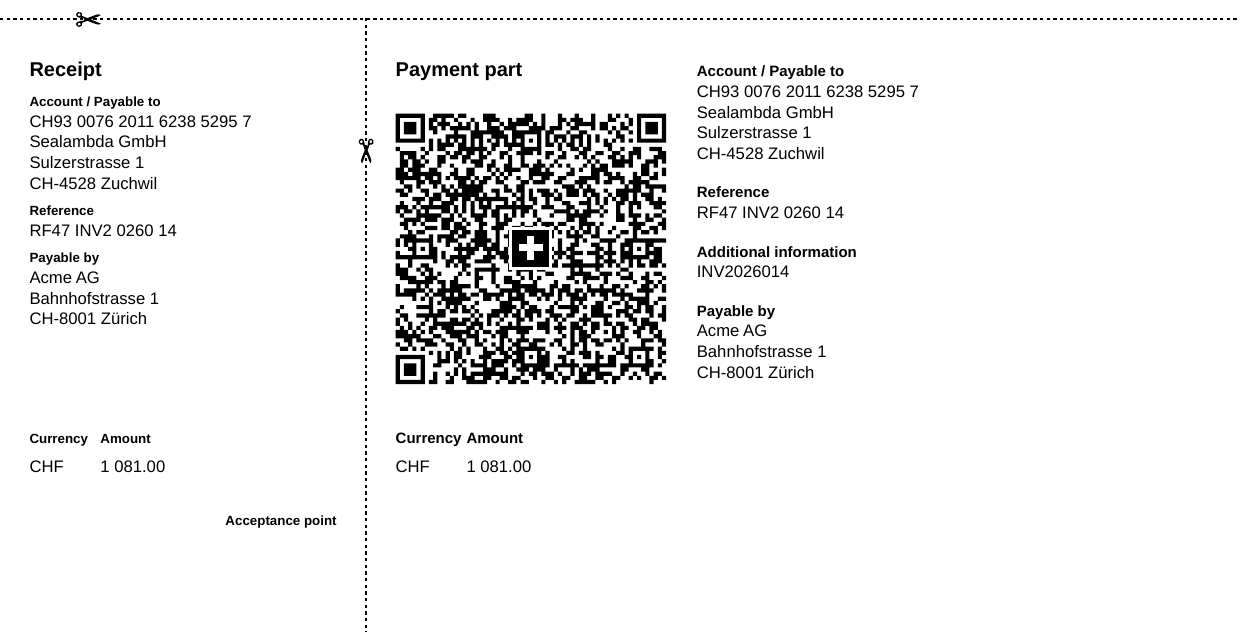
SCOR — the ISO 11649 Creditor Reference, paid into the regular IBAN.
RF, two check digits, then the invoice number itself:
Readable on a bank statement, quotable in a reminder email, valid on a Swiss
QR-bill in CHF and EUR and in a SEPA transfer. It is what an account without
a qr_iban uses, what every QR-bill in EUR uses, and what every export invoice
uses. Prefer it although you have a QR-IBAN? Say so:
The same invoice under each scheme — the payment part is what the customer scans or retypes. With a QR-IBAN and the bank's identification, a QR reference whose tail is the invoice's own digits:
With the regular IBAN, a creditor reference that spells the invoice number out:
Payment references covers the whole picture — the three types the standard defines, the exact pairing rules with their citations, what the QR reference contains, how to choose, and how a payment finds its way back to the invoice.
The reference is derived from the invoice number and nothing else, which is
what lets quints import and quints match credit an incoming payment to
its invoice — by the reference it quotes, the plain number, or a QR reference
decoded back into one. Two invoices never share a reference as long as their
numbers differ in a letter or digit: case and punctuation are not carried, so
INV-014 and INV014 would collide (the matcher then reports the payment as
ambiguous instead of guessing). A number too long to encode is refused instead
of truncated, because a truncated reference is a payment credited to somebody
else's invoice. quints invoice prints the reference it used:
Set reference: on the invoice only to re-issue one that went out with a
reference from elsewhere — it is validated by its check digits at load, and
refused if it doesn't match the account's scheme.
Your customer's references
Accounts-payable departments pay against their own numbers.
customer_reference is their PO or order number; references is the long
tail — a Leitweg-ID, a CIG/CUP, a cost centre, a framework contract:
number: INV2026014
customer: acme
customer_reference: PO-2026-118
references:
  - label: Leitweg-ID
    value: 991-12345-67
  - label: Kostenstelle
    value: KST-4711
Both are printed next to the invoice number and date, on domestic and export
invoices alike, with customer_reference labelled in the invoice's language
("Ihre Referenz" / "Your reference" / "Su referencia") and the extras labelled
exactly as you wrote them. customer_reference also lands in the ledger draft
as customer_reference: metadata, so the books can be searched by the number
the customer quotes.
On a QR-bill it additionally travels in the structured billing information element, in Swico's S1 syntax:
That is the invoice number, its date, your customer's reference, your UID, the VAT rate and the payment terms — machine-readable for the payer's accounts-payable software. Banks do not forward it with the payment; what comes back to you is the reference and the unstructured message, which carries the invoice number.
Branding
The PDF's typography and palette come from the brand block in
issuer.yaml. Three font roles are separate on purpose:
brand:
  font: Geist              # body copy
  font_display: Newsreader # the title
  font_mono: Geist Mono    # every figure, IBAN and reference
  font_dir: invoicing/fonts # optional — ship your own families
  accent: "#6b1f4a"        # title, amount due, leading rules
  logo: invoicing/wordmark.svg
  logo_height: 9           # mm
font_mono is what keeps amount columns aligned on the digit — point it at
any monospace (or a face with tabular figures; the template requests them
either way). All the values above are also the defaults: the three families
ship with quints, so an issuer that configures nothing still renders
identically on every machine. Set font_dir to use families of your own;
that also switches machine-installed fonts off, so a designer's locally
installed variable font can never change how the same invoice renders
elsewhere. The full token list (ink, subtle, rule, panel, display weight and
stretch) is in the issuer schema.
Foreign invoices
An export invoice (kind: export) renders without a QR part — it shows the
full SEPA/international payment instruction instead (beneficiary, IBAN,
BIC/SWIFT, bank, reference) — and defaults to the EU B2B reverse-charge note,
which requires the customer's VAT number in the registry. Set
reverse_charge: false for customers outside a reverse-charge regime (e.g.
US). The currency's account needs both a regular iban (a QR-IBAN can't
receive an ordinary credit transfer) and a bic.
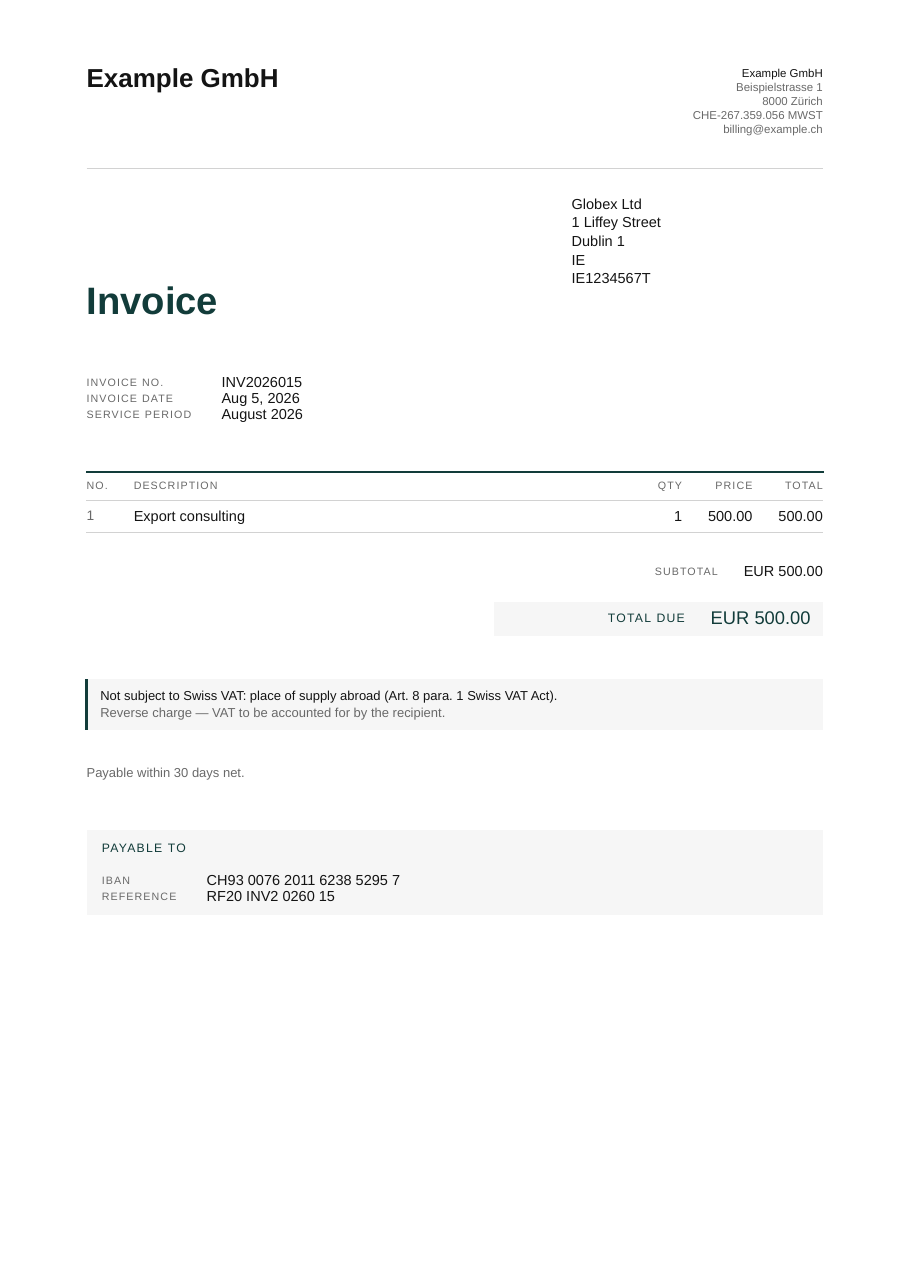
A project scaffolded with quints init --samples includes both flavours:
invoicing/acme-<year>-07.yaml (domestic QR-bill) and
invoicing/globex-<year>-08.yaml (EUR export), each tied to a booking in the
sample quarter so the cross-check reconciles.
Editor validation
The invoice, issuer, and customers files have JSON Schemas, published with
this site at
/quints/schema/.
Scaffolded YAMLs already carry the matching yaml-language-server: $schema=
modeline, so schema-aware editors (and agents) validate fields as you type.
To work offline:
writes the same schemas to invoicing/schema/.
Who owes you
Open invoices against Receivable:Trade, grouped by invoice id, aged by due
date. An invoice disappears from the list when the payment leg is booked with
the same ^invoice-id link.
Each invoice shows in its own currency; below the per-currency totals a
consolidated total converts everything at the latest rate in your price file
(≈ Total CHF). It consolidates in the operating currency by default —
--in EUR picks another. A currency with no rate is excluded and called out;
quints prices sync fixes that.